> For the complete documentation index, see [llms.txt](https://doc.dastra.eu/llms.txt). Markdown versions of documentation pages are available by appending `.md` to page URLs; this page is available as [Markdown](https://doc.dastra.eu/nl/features/gerer-le-consentement-aux-cookies/integration-technique/blocage-des-cookies/google-consent-mode-v2.md).
# Google Consent Mode V2
Dastra ondersteunt Google Consent Mode V2 standaard. Deze pagina beschrijft de vereisten en de stappen om deze te activeren voor de services van uw cookiewidget.
Dastra ondersteunt **Google Consent Mode V2** standaard. Deze integratie stuurt een `consent_update`-signaal naar Google Tag Manager (GTM) zodra een gebruiker toestemming geeft, zodat de Google-tags deze keuze respecteren voordat er tracking wordt gestart.
## Vereisten
* Het standaard toestemmingsfragment (zie stap 2) moet in de `` van uw website worden geplaatst, **vóór** het laden van Google Tag Manager.
* Configureer in Google Tag Manager een **"Google Tag"** die op alle pagina's wordt geactiveerd.
* De integratie werkt met **Google Ads** (zonder personalisatie) en **Google Analytics**.
* Als u Google Ads-tags voor conversietracking of remarketing gebruikt, zorg er dan voor dat deze tags alleen na toestemming worden geactiveerd, met behulp van een aangepaste gebeurtenis zoals `dastra:consent:{service-slug}` (voorbeeld: `dastra:consent:googleleads`).
## Stap 1 — Consent Mode V2 activeren voor de service
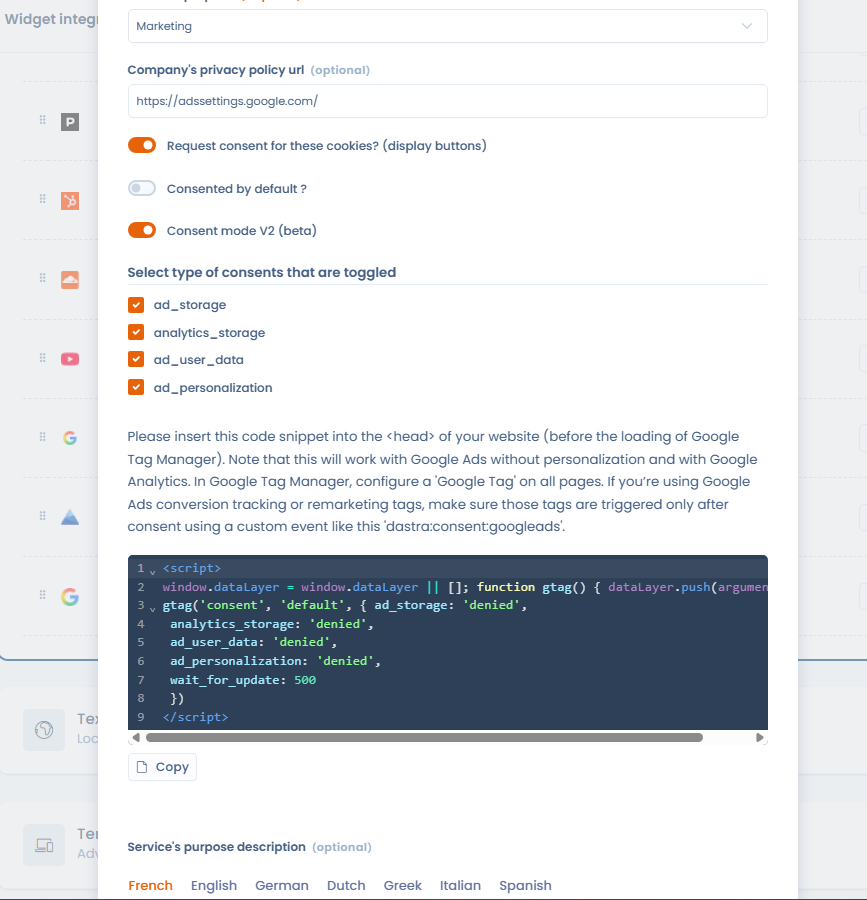
Bewerk in de widgetintegratie de betreffende service (bijv. Google Analytics, Google Ads) en activeer de schakelaar **"Consent mode V2"**. Eenmaal geactiveerd, stuurt de Dastra-banner automatisch het `consent_update`-signaal naar GTM telkens wanneer een gebruiker met de toestemmingsbanner interageert.
Selecteer vervolgens de **toestemmingstypen** die voor deze service worden aangestuurd (standaard allemaal aangevinkt):
* `ad_storage`
* `analytics_storage`
* `ad_user_data`
* `ad_personalization`
Consent Mode V2 activeren voor een service van de cookiewidget
Het standaard toestemmingsfragment dat u in uw website moet plaatsen, wordt rechtstreeks in de interface weergegeven: gebruik de knop **Kopiëren** om het over te nemen en volg daarna stap 2.
## Stap 2 — De standaard toestemmingscode vóór GTM plaatsen
Om ervoor te zorgen dat de Google-tags op het toestemmingssignaal wachten voordat ze worden geactiveerd, plaatst u het volgende fragment **vóór** de GTM-initialisatiecode op uw pagina:
```html
```
Dit fragment geeft de Google-tags de instructie om maximaal 500 ms te wachten op het `consent_update`-signaal voordat de tracking wordt uitgevoerd. Als de gebruiker de betreffende services accepteert, activeert de Dastra-banner dit signaal automatisch en kunnen de tags worden uitgevoerd.
{% hint style="warning" %}
Dit fragment moet **vóór** de GTM-initialisatie worden geplaatst. Als het erna wordt geladen, kunnen de Google-tags worden geactiveerd zonder op toestemming te wachten.
{% endhint %}
## Verder gaan
Voor het activeren van tags op basis van toestemmingen (dataLayer-gebeurtenissen, blocking triggers...), zie de pagina over Google Tag Manager:
{% content-ref url="/pages/yLeIeF9Q8a1JxvZna7oF" %}
[Google Tag Manager](/nl/features/gerer-le-consentement-aux-cookies/integration-technique/blocage-des-cookies/google-tag-manager.md)
{% endcontent-ref %}
---
# Agent Instructions
This documentation is published with GitBook. GitBook is the documentation platform designed so that both humans and AI agents can read, navigate, and reason over technical content effectively. Learn more at gitbook.com.
## Querying This Documentation
If you need additional information that is not directly available in this page, you can query the documentation by asking a question.
Perform an HTTP GET request on the following URL with the `ask` and `goal` query parameters:
```
GET https://doc.dastra.eu/nl/features/gerer-le-consentement-aux-cookies/integration-technique/blocage-des-cookies/google-consent-mode-v2.md?ask=&goal=
```
`ask` is the immediate question: it should be specific, self-contained, and written in natural language.
`goal` is what the user is ultimately trying to achieve, the reason they need the answer. Sharing it helps GitBook give you a better, more relevant answer. A goal is most helpful when it describes the outcome the user wants rather than restating the question. For example, with `ask=how do I create an API token`, a goal like `automate deployments from our CI pipeline` lets GitBook tailor the answer to that use case.
The response will contain a direct answer to the question and relevant excerpts and sources from the documentation.
Use this mechanism when the answer is not explicitly present in the current page, you need clarification or additional context, or you want to retrieve related documentation sections.