> For the complete documentation index, see [llms.txt](https://doc.dastra.eu/llms.txt). Markdown versions of documentation pages are available by appending `.md` to page URLs; this page is available as [Markdown](https://doc.dastra.eu/en/features/trust-center/configuration/ai-systems.md).

# AI systems

Publish the list of your AI systems in your Trust Center to inform your stakeholders with transparency.

The Trust Center can publicly present the AI systems declared in your workspace. Each system opens on a read-only record. This presentation supports transparency toward your customers, partners and data subjects.

## Enable the AI systems tab

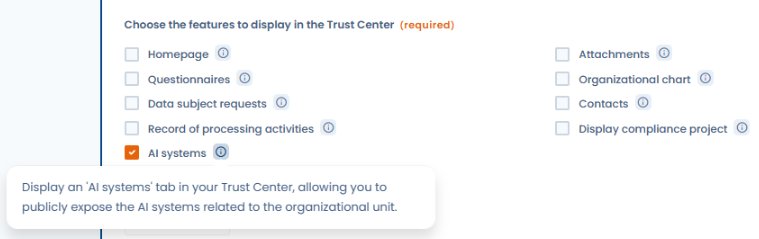
Check **AI systems** in the **Configuration** section of the editing page. The box is not checked by default.

<figure><img src="https://2697025545-files.gitbook.io/~/files/v0/b/gitbook-x-prod.appspot.com/o/spaces%2F-LvBxs22wUMicv9uWp6C-1972196547%2Fuploads%2Fgit-blob-c487565c476a5feceda164ed3027f605d0010f62%2Ftrust-center-ai-systems-config.png?alt=media" alt="AI systems checkbox in the Trust Center configuration with its tooltip"><figcaption><p>Check AI systems in the features to display to add the tab to the public portal</p></figcaption></figure>

{% hint style="info" %}
The AI systems tab is only available to organizations whose subscription includes the AI systems module. If the box is greyed out, contact the Dastra team to enable the module.
{% endhint %}

Once the feature is enabled, an **AI systems** tab appears on the public portal.

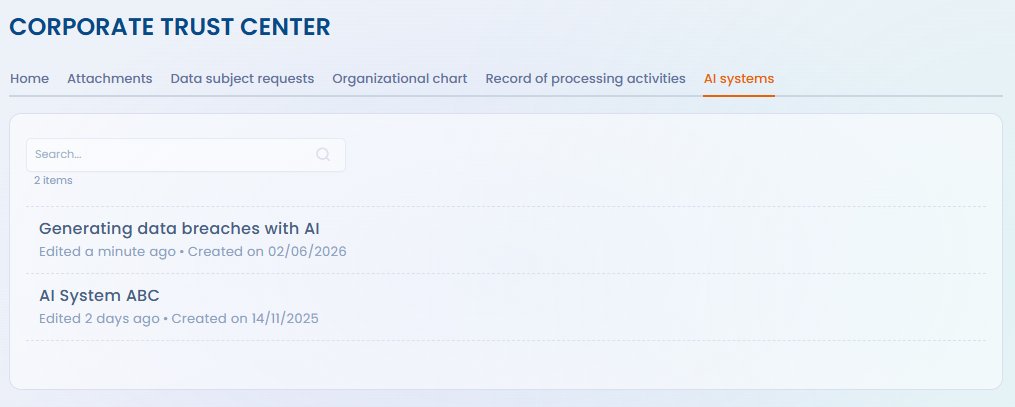
<figure><img src="https://2697025545-files.gitbook.io/~/files/v0/b/gitbook-x-prod.appspot.com/o/spaces%2F-LvBxs22wUMicv9uWp6C-1972196547%2Fuploads%2Fgit-blob-6ec350666bbaa57b95beef0c66a6cdde28ad4031%2Ftrust-center-ai-systems-public.png?alt=media" alt="AI systems tab displayed on the public Trust Center"><figcaption><p>Public view of the Trust Center with the AI systems tab</p></figcaption></figure>

## Published systems

No setting lets you choose systems one by one. As soon as the tab is enabled, the portal lists every AI system that meets these three conditions:

* it belongs to the Trust Center's organizational unit or to one of its child units;
* its state is **Active**;
* it is not archived.

To remove a system from the portal, change its organizational unit, change its state or archive it.

When the Trust Center's organizational unit has child units, visitors get an **Organizational unit** filter above the list. It only offers the Trust Center's unit and its child units.

{% hint style="warning" %}
Enabling the tab immediately publishes every system that meets these conditions. Before you do, check the list of the unit's systems in the [record of AI systems](https://doc.dastra.eu/en/features/ai-systems/record.md).
{% endhint %}

Visitors can search for a system by name and, when the Trust Center's unit has child units, narrow the list to one of them. See [Homepage and general configuration](https://doc.dastra.eu/en/features/trust-center/configuration/home.md).

## Information displayed

In the list, each system appears with its reference, name, tags, organizational unit and its creation and update dates. A click opens its record, with a **Back** button.

<figure><img src="https://2697025545-files.gitbook.io/~/files/v0/b/gitbook-x-prod.appspot.com/o/spaces%2F-LvBxs22wUMicv9uWp6C-1972196547%2Fuploads%2Fgit-blob-c3a23135d615a4ca792ed74e8df45605f8cd8db4%2Ftrust-center-ai-systems-1.png?alt=media" alt="Read-only record of an AI system on the public portal"><figcaption><p>The record of an AI system on the public portal</p></figcaption></figure>

The Trust Center does not choose the fields of this record: it reuses the **Summary** of the AI system in the application, in read-only mode. Depending on what is filled in, it presents:

* the name, organizational unit, tags, progress, reference, description, state, creation and update dates, and the creator;
* the AI models;
* the AI system users, with their role;
* the assets, datasets and categories of data subjects;
* the risk analysis, with the risk level and its justification;
* the expected benefit;
* the documentation, including the transparency notice and attached files.

{% hint style="warning" %}
The record can show the names of the AI system users and of its creator. Check this information before enabling the tab. Download buttons for files only appear for a visitor signed in to Dastra.
{% endhint %}

To complete the record, see [Establishing a record of AI systems](https://doc.dastra.eu/en/features/ai-systems/record.md) and [Transparency notice](https://doc.dastra.eu/en/features/ai-systems/transparency-notice.md).

## Link with the AI Act

Publishing your AI systems in the Trust Center gives your stakeholders a central reference point. This publication does not replace the information that the AI Act requires toward data subjects, nor the technical documentation required for high-risk systems.


---

# Agent Instructions
This documentation is published with GitBook. GitBook is the documentation platform designed so that both humans and AI agents can read, navigate, and reason over technical content effectively. Learn more at gitbook.com.

## Querying This Documentation
If you need additional information that is not directly available in this page, you can query the documentation by asking a question.

Perform an HTTP GET request on the following URL with the `ask` and `goal` query parameters:

```
GET https://doc.dastra.eu/en/features/trust-center/configuration/ai-systems.md?ask=<question>&goal=<user_goal>
```

`ask` is the immediate question: it should be specific, self-contained, and written in natural language.
`goal` is what the user is ultimately trying to achieve, the reason they need the answer. Sharing it helps GitBook give you a better, more relevant answer. A goal is most helpful when it describes the outcome the user wants rather than restating the question. For example, with `ask=how do I create an API token`, a goal like `automate deployments from our CI pipeline` lets GitBook tailor the answer to that use case.

The response will contain a direct answer to the question and relevant excerpts and sources from the documentation.

Use this mechanism when the answer is not explicitly present in the current page, you need clarification or additional context, or you want to retrieve related documentation sections.