> For the complete documentation index, see [llms.txt](https://doc.dastra.eu/llms.txt). Markdown versions of documentation pages are available by appending `.md` to page URLs; this page is available as [Markdown](https://doc.dastra.eu/en/features/risks/process/assess.md).

# 2. Assess

Learn how to assess risk in Dastra.

Based on the elements identified in the risk type and the context of the object, assess the risk. The assessment is based on probability and impact. The app labels them **likelihood** and **Severity**.

In the risk page, open the **Risk assessment** section. Choose the likelihood and severity of the initial risk, then those of the residual risk. If the risk type contains a pre-assessment, these values are already filled in. The **Assessment justification** field keeps a record of your reasoning.

<figure><img src="https://2697025545-files.gitbook.io/~/files/v0/b/gitbook-x-prod.appspot.com/o/spaces%2F-LvBxs22wUMicv9uWp6C-1972196547%2Fuploads%2Fgit-blob-472773097fca8979170aebd517e519d752dbfd16%2Frisks-assess-1.png?alt=media" alt="Risk assessment section: initial and residual levels, justification and risk matrix"><figcaption><p>The Risk assessment section and its matrix</p></figcaption></figure>

Click **Assess risk** to move the risk to the **Processing** step. Only the risk owner can do this. The **Switch back** button takes the risk back a step.

## Determining the risk scale

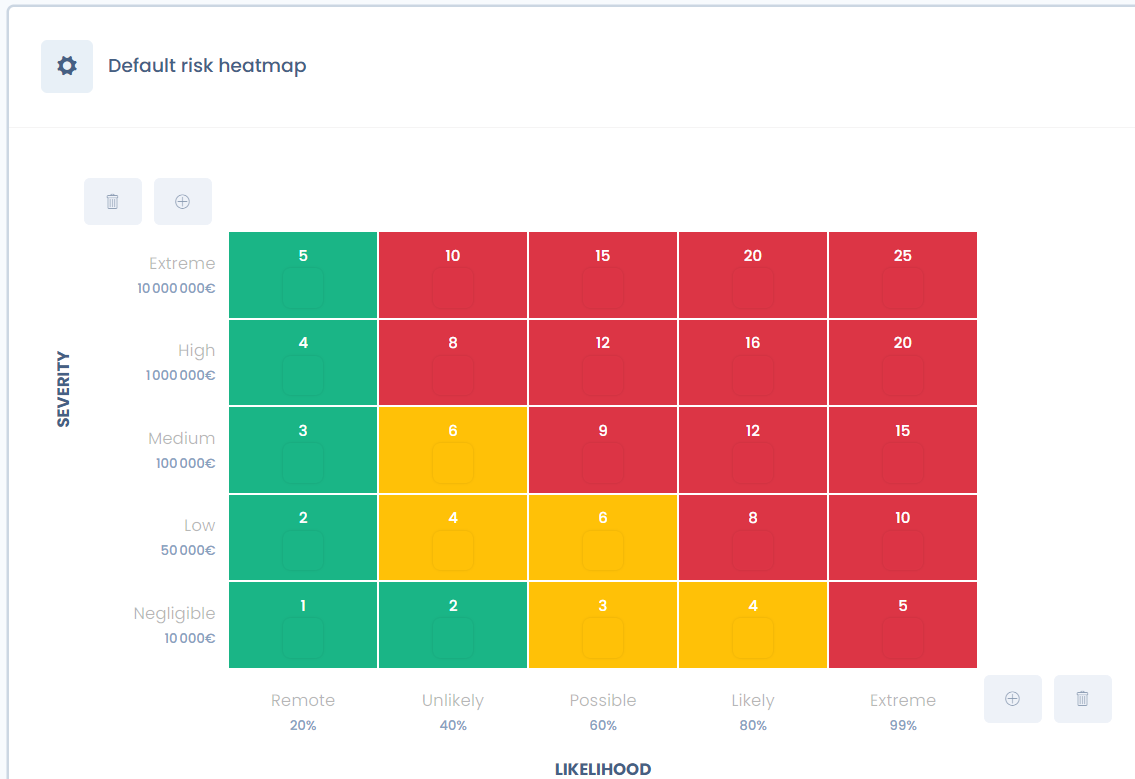
To assess a risk, you position these two values on a scale: the risk scale. It is generally based on 5 levels. In France, the Ebios method (promoted by the CNIL and ANSSI in particular) uses a 4-level scale.

For each level, determine a condition of application. The scale can correspond to a financial amount, for example for the impact.

<figure><img src="https://2697025545-files.gitbook.io/~/files/v0/b/gitbook-x-prod.appspot.com/o/spaces%2F-LvBxs22wUMicv9uWp6C-1972196547%2Fuploads%2Fdi992IaukS3v0oPnL9py%2Fimage.png?alt=media&amp;token=cc856a94-20a6-4a20-98c3-9b4723d5ff54" alt="Default risk scale: matrix of 5 severity levels and 5 likelihood levels"><figcaption><p>The default risk scale</p></figcaption></figure>

### Configure the risk scale

The scale is customizable. It is defined per workspace, in **Workspace settings** > **Risk management**, under **Process**. This entry is visible with write access to risks; creating, saving or activating a scale also requires write access to advanced settings.

<figure><img src="https://2697025545-files.gitbook.io/~/files/v0/b/gitbook-x-prod.appspot.com/o/spaces%2F-LvBxs22wUMicv9uWp6C-1972196547%2Fuploads%2Fgit-blob-9cd03e4c5c9ff1ac5aa42ee0a48e63ff5e15482e%2Frisks-assess-2.png?alt=media" alt="Risk management settings page: default scale and Create custom settings button"><figcaption><p>The risk scales of the workspace</p></figcaption></figure>

The default scale, **Default risk heatmap** (5 levels), is read-only. To use another one:

1. Click **Create custom settings**.
2. Name the scale and choose a **Risk profile template**: **5 levels - default**, **4 levels - Classic DPIA** or **3 levels - light**.
3. Open the new scale. Click a likelihood or severity graduation to edit its label, its description and its value: by default, an amount in euros for severity and a percentage for likelihood. The plus and trash buttons add or remove a level, from 1 to 9 levels.
4. Change the units (**Impact unit**, **Probability unit**) and the color of each matrix cell if needed.
5. Click **Save changes**, then **Save and enable the profile** to use the scale.

{% hint style="warning" %}
Enabling another scale when risks already exist seriously affects the risk statistics: the app asks for a confirmation before enabling the profile.
{% endhint %}

The score of a risk is the product of its severity and its likelihood. The maximum score of a scale is the product of its two highest levels: 25 with the 5-level scale, 16 with the 4-level scale and 9 with the 3-level scale. The percentages shown in Dastra express a score relative to this maximum.

For a calculation step by step, on the default scale and on the CNIL scale, see [Risk scoring](https://doc.dastra.eu/en/examples/examples/risk-scoring.md).

## Probability (likelihood)

Probability is an evaluation of how often a risk occurs. It is an empirically evaluated score (traditionally rated out of 5). Each level can correspond to a frequency of occurrence of the risk, and therefore of the threat.

## Impact (severity)

The impact is the evaluation of the consequence of a dreaded event on the organization. It is the severity of this consequence that is estimated.

Depending on the assessed risk, the impact varies. You can estimate it empirically, for example by estimating the cost of a data breach or of data unavailability after a cyber attack.

### Use the event log

The **Events** log keeps the memory of past events. To add an event, open **Risk management** > **Events** and click **Create event**. Fill in its name, the **Event date**, the **Financial impact of the incident** and, if possible, the risk type concerned.

<figure><img src="https://2697025545-files.gitbook.io/~/files/v0/b/gitbook-x-prod.appspot.com/o/spaces%2F-LvBxs22wUMicv9uWp6C-1972196547%2Fuploads%2Fgit-blob-af6d658fff43327fd564afed172bcc2bc9772893%2Frisks-assess-3.png?alt=media" alt="Event log with three events, their date and their financial impact"><figcaption><p>The event log</p></figcaption></figure>

For a risk whose type is linked to events, the **Risk assessment** section shows their frequency per year and per month, and their minimum, average and maximum financial impact. These figures help you choose a realistic likelihood and severity.

{% hint style="info" %}
For risks concerning individuals (under the GDPR, for example), the impact is the harm suffered by the data subjects and the infringement of their rights and freedoms: discrimination, refusal of a contract, inconvenience.
{% endhint %}

## A template for privacy impact assessment

An assessment is always contextual. However, the methodology published by the CNIL for conducting data protection impact assessments (DPIA) provides a grid for reading the risk scale. Here is the table proposed by the CNIL in its guide to impact assessments.

### Severity

<table data-view="cards" data-full-width="true"><thead><tr><th>Levels</th><th>Generic impact descriptions (direct and indirect)</th><th>Examples of physical impacts</th><th>Examples of material impacts</th><th>Examples of moral impacts</th></tr></thead><tbody><tr><td>1. Negligible</td><td>The data subjects will not be affected, or may experience some inconvenience, which they will overcome without difficulty.</td><td>Lack of adequate care for a non-autonomous person (minor, person under guardianship); transient headaches.</td><td>Time wasted repeating procedures or waiting for them to be completed; receipt of unsolicited mail (spam); reuse of data published on websites for targeted advertising (information from social networks reused for a paper mailing); targeted advertising for everyday consumer products.</td><td>Simple annoyance at information received or requested; fear of losing control of one's data; feeling of invasion of privacy without any real or objective harm (commercial intrusion); loss of time setting up one's data; non-respect of freedom to come and go online due to refusal of access to a commercial site (alcohol, due to an incorrect age).</td></tr><tr><td>2. Limited</td><td>The data subjects could experience significant inconvenience, which they will be able to overcome despite a few difficulties.</td><td>Minor physical ailment (benign illness due to non-compliance with contraindications); lack of care causing minimal but real harm (disability); defamation giving rise to physical or psychological reprisals.</td><td>Unscheduled payments (fines assigned by mistake), additional costs (bank charges, legal fees), non-payment; denial of access to administrative or commercial services; lost opportunities for comfort (cancellation of leisure activities, purchases, vacations, closure of an online account); missed professional promotion; account blocked for online services (games, administration); receipt of unsolicited targeted mail likely to damage the reputation of the data subjects; increased costs (higher insurance price); processing of erroneous data creating account malfunctions (bank, customer, social security); targeted online advertising on a private aspect that the person wished to keep confidential (pregnancy, pharmaceutical treatment); inaccurate or abusive profiling.</td><td>Refusal to continue using information systems (whistleblowing, social networks); minor but objective psychological harm (defamation, reputation); relationship difficulties with personal or professional contacts (image, tarnished reputation, loss of recognition); feeling of invasion of privacy without irremediable harm; intimidation on social networks.</td></tr><tr><td>3. Important</td><td>The data subjects could experience significant consequences, which they should be able to overcome, but with real and significant difficulties.</td><td>Serious physical condition causing long-term damage (worsening of health due to poor treatment or failure to comply with contraindications); alteration of physical integrity, for example following an assault, domestic accident or work accident.</td><td>Non-compensated embezzlement; non-temporary financial difficulties (obligation to take out a loan); targeted, one-off, non-recurring opportunities lost (home loan, refusal of studies, internships or jobs, exam ban); bank ban; damage to property; loss of home; loss of job; separation or divorce; financial loss following a scam (phishing); blocked abroad; loss of customer data.</td><td>Serious psychological condition (depression, development of a phobia); feeling of invasion of privacy and irremediable harm; feeling of vulnerability following a summons; feeling of infringement of fundamental rights (discrimination, freedom of expression); victim of blackmail; cyberbullying and mobbing.</td></tr><tr><td>4. Maximum</td><td>The data subjects could experience significant, even irremediable, consequences that they may not be able to overcome.</td><td>Long-term or permanent physical ailment (following non-compliance with a contraindication); death (murder, suicide, fatal accident); permanent impairment of physical integrity.</td><td>Financial peril; substantial debts; inability to work; inability to relocate; loss of evidence in litigation; loss of access to vital infrastructure (water, electricity).</td><td>Long-term or permanent psychological condition; criminal sanction; abduction; loss of family ties; inability to take legal action; change in administrative status and/or loss of legal autonomy (guardianship).</td></tr></tbody></table>

On this scale, take the following contextual elements into account:

* the identifying nature of the data;
* the nature of the sources of risk;
* the number of interconnections, in particular with other countries;
* the number of recipients, which makes it easier to correlate data that were initially separate.

### Likelihood

To assess probability, the CNIL suggests the following scale:

| Levels     | Description                                                                                                                                                                                                                                                      |
| ---------- | ---------------------------------------------------------------------------------------------------------------------------------------------------------------------------------------------------------------------------------------------------------------- |
| Negligible | It does not seem possible for the selected risk sources to carry out the threat by relying on the characteristics of the media (for example, theft of paper media stored in an organization's premises, access to which is controlled by badge and access code). |
| Limited    | It seems difficult for the selected risk sources to carry out the threat by relying on the characteristics of the media (for example, theft of paper media stored in an organization's premises, access to which is controlled by badge).                        |
| Important  | It seems possible for the selected risk sources to carry out the threat by relying on the characteristics of the media (for example, theft of paper media stored in the offices of an organization, access to which is controlled by a receptionist).            |
| Maximum    | It seems extremely easy for the selected risk sources to carry out the threat by relying on the characteristics of the media (for example, theft of paper media stored in the organization's public hall).                                                       |

On this scale, take the following contextual elements into account:

* whether the system is open to the Internet or closed;
* whether or not data is exchanged with other countries;
* interconnections with other systems, or none;
* heterogeneity or homogeneity of the system;
* variability or stability of the system;
* the organization's image.


---

# Agent Instructions
This documentation is published with GitBook. GitBook is the documentation platform designed so that both humans and AI agents can read, navigate, and reason over technical content effectively. Learn more at gitbook.com.

## Querying This Documentation
If you need additional information that is not directly available in this page, you can query the documentation by asking a question.

Perform an HTTP GET request on the following URL with the `ask` and `goal` query parameters:

```
GET https://doc.dastra.eu/en/features/risks/process/assess.md?ask=<question>&goal=<user_goal>
```

`ask` is the immediate question: it should be specific, self-contained, and written in natural language.
`goal` is what the user is ultimately trying to achieve, the reason they need the answer. Sharing it helps GitBook give you a better, more relevant answer. A goal is most helpful when it describes the outcome the user wants rather than restating the question. For example, with `ask=how do I create an API token`, a goal like `automate deployments from our CI pipeline` lets GitBook tailor the answer to that use case.

The response will contain a direct answer to the question and relevant excerpts and sources from the documentation.

Use this mechanism when the answer is not explicitly present in the current page, you need clarification or additional context, or you want to retrieve related documentation sections.