> For the complete documentation index, see [llms.txt](https://doc.dastra.eu/llms.txt). Markdown versions of documentation pages are available by appending `.md` to page URLs; this page is available as [Markdown](https://doc.dastra.eu/en/features/privacy-hubs/configuration/ai-systems.md).

# AI Systems

Dastra's Trust center lets you publicly expose (or restrict access to) the AI systems declared in your workspace. This feature supports the transparency obligations of the AI Act and builds trust with your customers, partners, and data subjects.

***

## Enabling the AI Systems tab

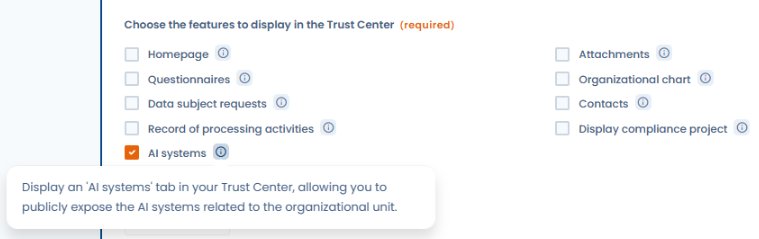
In your Trust center configuration, activate the **AI Systems** module under **Trust center > Configuration > AI Systems**.

<figure><img src="/files/O9FZQaR5FB7xic1dRSI4" alt="AI systems checkbox in the Trust center configuration with tooltip"><figcaption><p>Check "AI systems" in the features to display to activate the tab on the public portal</p></figcaption></figure>

{% hint style="info" %}
The AI Systems tab is only available to organizations whose subscription includes the AI Systems module. If you do not see this option in your Trust center configuration, contact the Dastra team to enable the module.
{% endhint %}

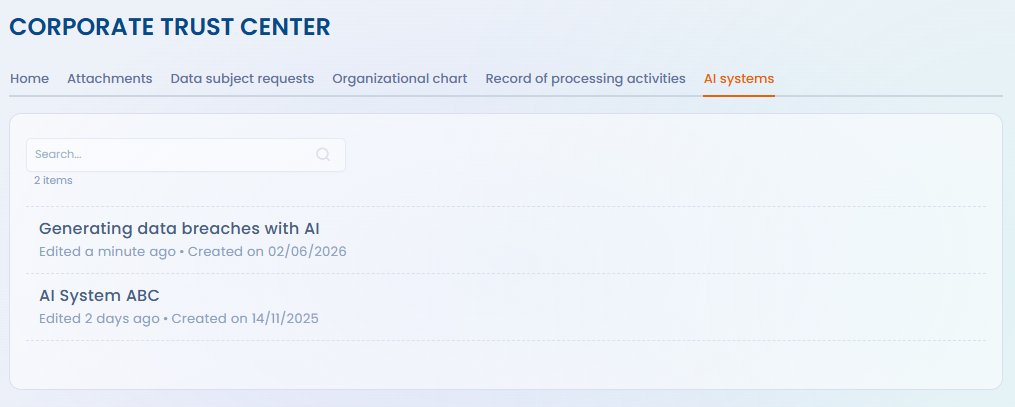
Once enabled, a dedicated tab appears on the public portal, listing the AI systems you have chosen to make visible.

<figure><img src="/files/kjlPi67baSymrGDm81kb" alt="AI systems tab displayed on the public Trust center"><figcaption><p>Public view of the Trust center with the "AI systems" tab listing exposed systems</p></figcaption></figure>

***

## Choosing which systems to publish

By default, no AI systems are published. For each system declared in Dastra's AI Systems module, you can choose to make it:

* **Visible** — it appears in the Trust center tab
* **Hidden** — it remains internal, not shown on the portal

This granularity lets you publish only the systems relevant to your stakeholders (e.g. systems deployed in direct interaction with customers or data subjects) while keeping internal systems out of public view.

***

## Information displayed

For each published AI system, the Trust center can display:

* The **name** and **description** of the system
* Its **purpose** and **categories of data subjects**
* The **AI Act risk level** (minimal, limited, high risk, prohibited)
* The **responsible contact** or AI point of contact
* The **transparency measures** in place

The fields displayed depend on the information recorded in the AI system record and your Trust center configuration choices.

***

## Link to AI Act obligations

Displaying AI systems in the Trust center helps fulfil the transparency obligations of the AI Act (Art. 13 and 50) for deployers of limited-risk and high-risk systems. It does not replace individual information notices required in certain cases, but provides a centralised reference point for your stakeholders.

{% hint style="info" %}
For systems classified as **high risk**, specific documentation obligations apply (Art. 13 AI Act). Publication in the Trust center complements — but does not replace — the technical documentation required by the regulation.
{% endhint %}


---

# Agent Instructions
This documentation is published with GitBook. GitBook is the documentation platform designed so that both humans and AI agents can read, navigate, and reason over technical content effectively. Learn more at gitbook.com.

## Querying This Documentation
If you need additional information that is not directly available in this page, you can query the documentation dynamically by asking a question.

Perform an HTTP GET request on the current page URL with the `ask` query parameter, and the optional `goal` query parameter:

```
GET https://doc.dastra.eu/en/features/privacy-hubs/configuration/ai-systems.md?ask=<question>&goal=<endgoal>
```

`ask` is the immediate question: it should be specific, self-contained, and written in natural language.
`goal` is optional and describes the broader end goal you are ultimately trying to accomplish on behalf of the user. GitBook uses it to tailor the answer towards what is most useful for that goal.

The response will contain a direct answer to the question and relevant excerpts and sources from the documentation.

Use this mechanism when the answer is not explicitly present in the current page, you need clarification or additional context, or you want to retrieve related documentation sections.