For the complete documentation index, see llms.txt. This page is also available as Markdown.

Incidents as a Data Processor

Manage data breach incidents in which your organisation acts as a Data Processor under the GDPR.
Dastra's data breach module adapts to your organisation's role in the incident: Data Controller (DC) or Data Processor (DP). This role determines the applicable obligations and which steps are displayed in the form.


Declaring your role at creation

When creating a new incident, a selector lets you choose between:

  • Data Controller β€” standard flow: supervisory authority notification, communication to data subjects, risk analysis.

  • Data Processor β€” adapted flow: the obligation to notify the supervisory authority directly does not apply; it is the Data Controller's responsibility to notify.

Create incident dialog with the Data Processor selector (Yes/No)
When creating an incident, indicate whether your organisation acts as a Data Processor

Regulatory basis β€” GDPR Art. 33(2)

The Data Processor is required to notify any personal data breach to the Data Controller without undue delay after becoming aware of it. There is no obligation for the Processor to notify the supervisory authority directly β€” that obligation rests with the Data Controller.


Form differences in Data Processor mode

When the Data Processor role is selected:

Element
DC mode
DP mode

Supervisory authority notification step

βœ… Shown

❌ Hidden

Communication to data subjects section

Standard

Replaced by DP section (see below)

Communication to Data Controller clients section

❌ Not present

βœ… Present


Communication to Data Controller clients

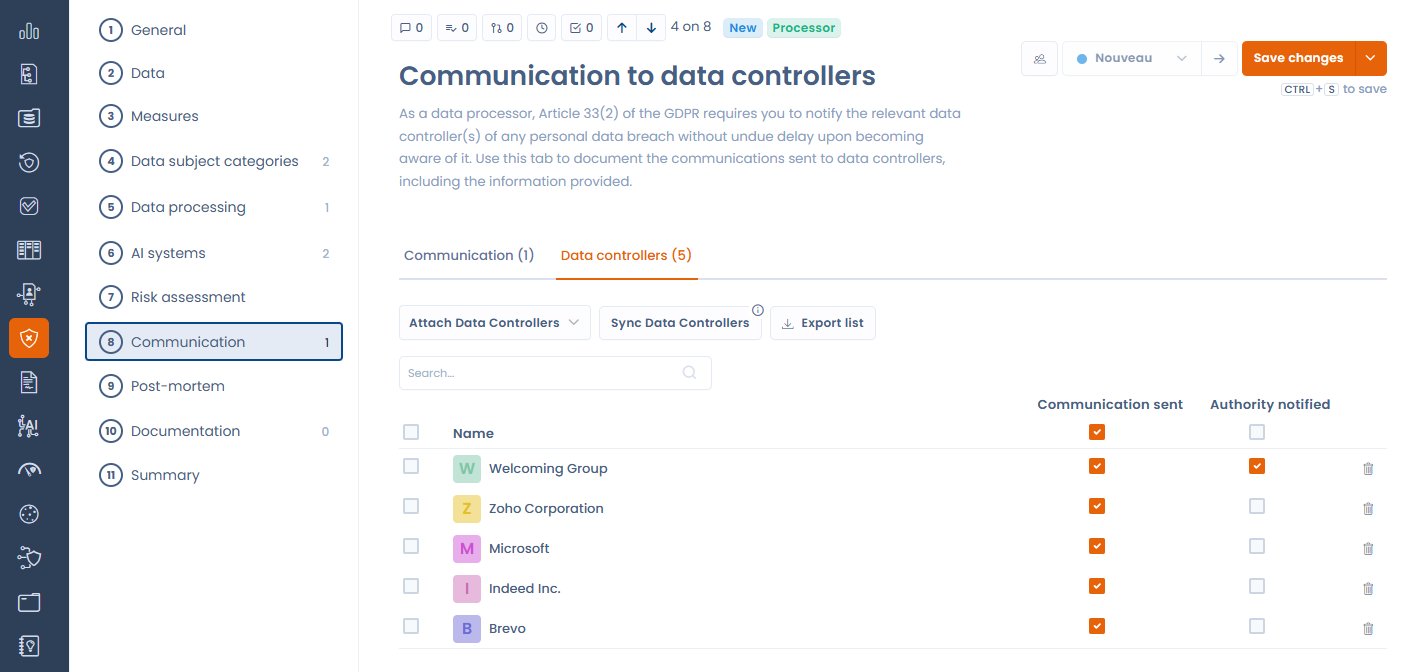
In Data Processor mode, a dedicated section replaces the standard communication section. It allows you to:

  • Associate the Data Controller clients involved in the incident β€” the list can be automatically synchronised from the processing activities linked to the incident

  • Track the notification status of each DC (notified / pending)

  • Export the list of involved DCs for your compliance file

Communication to Data Controllers section in a Data Processor incident
The Data Controllers tab lists the DCs to notify, with the Attach, Sync, and Export buttons

Automatic synchronisation of DCs from linked processing activities

If processing activities are associated with the incident, Dastra can automatically identify the relevant Data Controller clients from those activities and add them to the notification list. Click Sync Data Controllers in the dedicated section to trigger this synchronisation.


Best practices

  • Notify your DC clients without undue delay as soon as you become aware of the incident β€” the GDPR does not set a fixed deadline for the Processor's notification to the Controller (unlike the 72-hour deadline imposed on Controllers towards the supervisory authority), but prompt action is essential.

  • Document the date and time of each notification sent to DCs in the dedicated section.

  • Keep a record of acknowledgements or responses from DCs in the incident attachments.

Last updated

Was this helpful?