> For the complete documentation index, see [llms.txt](https://doc.dastra.eu/llms.txt). Markdown versions of documentation pages are available by appending `.md` to page URLs; this page is available as [Markdown](https://doc.dastra.eu/en/features/integrations.md).
# Integrations
Dastra integrates with Zapier automation platform and many other tools
## Integrations
Dastra connects to the tools your teams already use: import your application inventory from your ITAM or CMDB, synchronize data subject requests with your ticketing tool, post notifications in your collaboration channels, stream your security audit logs to your SIEM, or attach files from your cloud drives. Native connectors cover the most common tools; Zapier covers everything else.
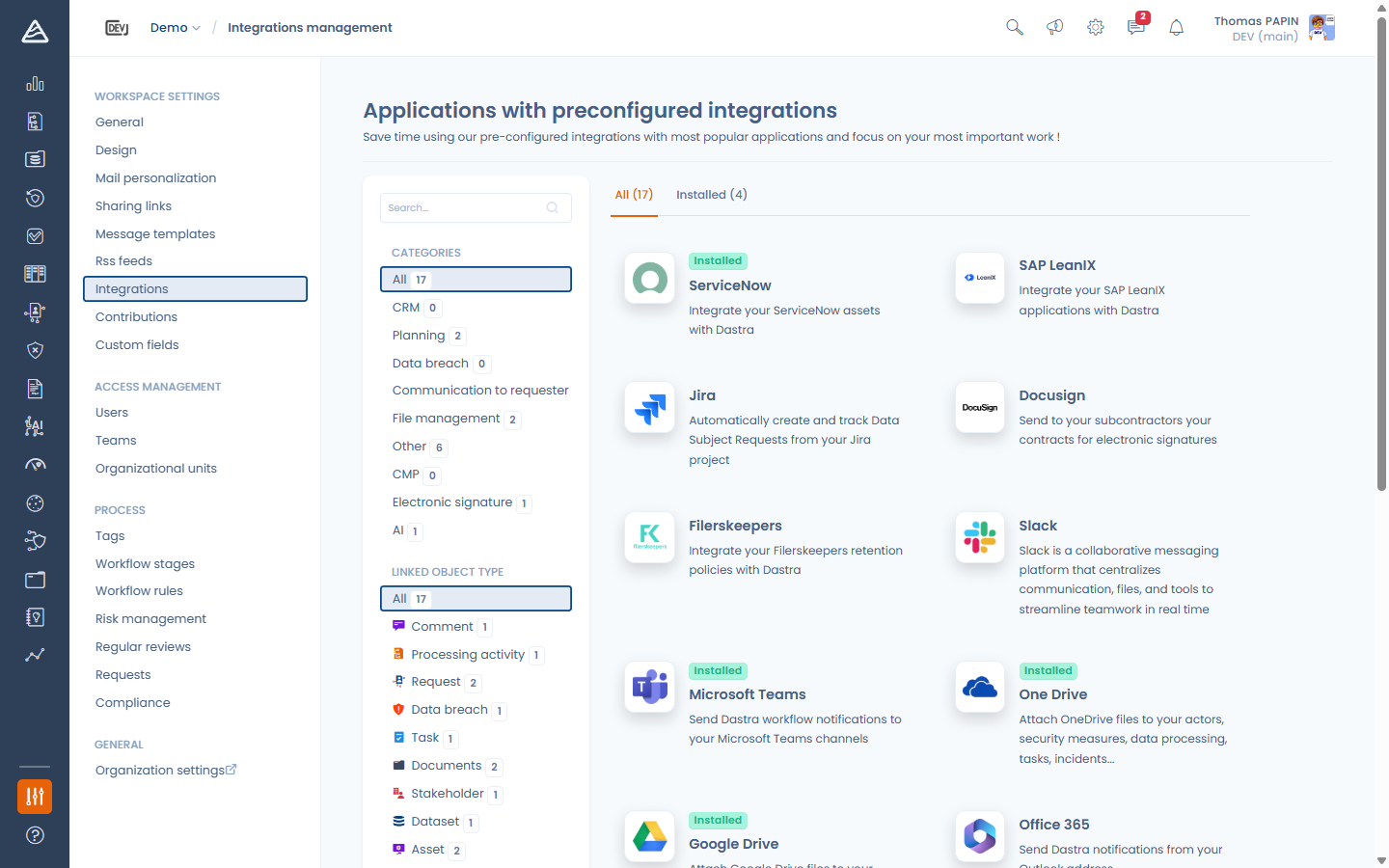
The integration store is available in **Settings > Integrations** of your workspace. It lists every available integration, filterable by category and by the Dastra object it targets, with an **All / Installed** switch.
#### How native integrations work
Every native integration is built on three concepts:
* **Use cases** — each integration exposes one or more use cases (for example *import applications as assets* or *synchronize data subject requests*). Use cases are installed, enabled, configured and uninstalled independently.
* **Connections** — a connection stores how Dastra authenticates against the external tool: credentials stored encrypted by Dastra, or a delegated OAuth authorization. You can create several connections to the same tool (a production and a sandbox instance, for instance) and choose which one each use case relies on. Connections display their health and can be tested at any time.
* **Field mapping** — import use cases let you choose, for each Dastra field, the external field that fills it, with default values, value transcoding for closed lists (statuses, lifecycle stages…) and AI-assisted suggestions.
Import connectors synchronize once a day and on demand with **Run synchronization now**. Every execution is traced in the integration logs, with the number of created, updated, flagged and in-error items.
Read the details in [Connections, use cases and field mapping](https://doc.dastra.eu/v/en/api-references/integrations/connections-and-field-mapping).
#### Available integrations
| Integration | What it does | Documentation |
| ---------------------------------------- | ------------------------------------------------------------------------------------------------------------------------------------------------------ | --------------------------------------------------------------------------------------------------------------------------------------- |
| **ServiceNow** | Imports the business applications of your CMDB as assets and keeps them in sync daily | [ServiceNow](https://doc.dastra.eu/v/en/api-references/integrations/servicenow) |
| **SAP LeanIX** | Imports your Application fact sheets as assets and keeps them in sync daily | [SAP LeanIX](https://doc.dastra.eu/v/en/api-references/integrations/sap-leanix) |
| **Jira** | Creates and tracks data subject requests from your Jira project, and sends your tasks to Jira as issues kept in sync (status, assignee, mapped fields) | [Jira](https://doc.dastra.eu/en/features/integrations/jira) |
| **Filerskeepers** | Integrates your Filerskeepers retention policies with Dastra | [Filerskeepers](https://doc.dastra.eu/v/en/api-references/integrations/filerskeepers) |
| **Microsoft Teams** | Posts your workflow rule notifications as cards in a Teams channel | [Microsoft Teams](https://doc.dastra.eu/v/en/api-references/integrations/microsoft-teams) |
| **HTTP / Custom API** | Calls any external API from your workflow rules with a custom HTTP request — method, URL, headers and a JSON or XML body built from the record | [HTTP / Custom API](https://doc.dastra.eu/en/features/integrations/custom-http) |
| **Slack** | Delivers Dastra notifications in your Slack workspace | — |
| **Docusign** | Sends your contracts to your subcontractors for electronic signature | [Docusign integration](https://doc.dastra.eu/v/en/features/contrats/integration-avec-docusign) |
| **OneDrive & SharePoint / Google Drive** | Attaches files from your OneDrive, SharePoint libraries or Google Drive to your actors, security measures, processing activities, tasks, incidents… | [OneDrive & SharePoint / Google Drive integrations](https://doc.dastra.eu/en/features/settings/integrations-onedrive-google-drive) |
| **Office 365 / Gmail** | Sends Dastra emails from your own mailbox | [SMTP configuration](https://doc.dastra.eu/v/en/features/settings/configuration-du-smtp) |
| **Incoming mail** | Turns the emails sent to a dedicated collection address into tasks, requests, data breaches, contracts or processing activities | [Incoming mail data collection](https://doc.dastra.eu/v/en/features/settings/data-collection-mailboxes) |
| **SIRENE (INSEE)** | Fills in your stakeholders' details from the French company registry | — |
| **AI provider** | Connects any OpenAI-compatible AI provider to the Dastra assistant | — |
| **Single sign-on (SSO)** | Lets your users sign in with your own identity provider | [Single Sign On (SSO)](https://doc.dastra.eu/v/en/features/settings/single-sign-on-sso) |
| **SIEM streaming** | Streams your security audit events to your SIEM in real time | [SIEM streaming](https://doc.dastra.eu/v/en/features/settings/siem-streaming) |
| **Zapier** | Connects Dastra to more than 3,000 applications through automated workflows | [Integrating Dastra with external tools](https://doc.dastra.eu/v/en/api-references/integrations/integrating-dastra-with-external-tools) |
Some integrations apply to your whole organization rather than to a workspace — single sign-on, SIEM streaming, Office 365 / Gmail and the AI provider. Their tile in the store takes you to the corresponding organization settings, where they are configured by an account owner.
#### Zapier: connect everything else
Zapier is an online automation tool that connects your applications and services without code. A **Zap** is an automated workflow made of a **trigger** and one or more **actions**: when the trigger event occurs, the actions run.
On the Dastra side, Zapier can react to two triggers — *new data subject request created* and *new task created* — and perform six actions: create a task, create an actor, create a data subject request, link an actor to an existing processing activity, search an actor, and find or create an actor. You can therefore start from a Dastra event to act in a third-party application, or start from a third-party event to act in Dastra.
Pre-configured templates (Salesforce, Zoho, Trello, Google Sheets, Excel, Outlook, Azure DevOps…) are available from the [Dastra page of the Zapier catalog](https://zapier.com/apps/dastra/integrations), and the Zap editor lets you build your own workflow from scratch. See [Integrating Dastra with external tools](https://doc.dastra.eu/v/en/api-references/integrations/integrating-dastra-with-external-tools) and the [Zapier FAQ](https://doc.dastra.eu/v/en/api-references/integrations/frequently-asked-questions).
#### Security and data protection
* Integration credentials and tokens are stored encrypted, are never returned by the API, and are erased when you uninstall an integration or delete a workspace.
* OAuth flows strictly validate their callbacks, and the inbound webhook endpoints are rate-limited.
* Integrations are scoped to a workspace: data from one workspace is never visible from another.
* Records created by an integration (assets, requests…) belong to your workspace and are kept when the integration is uninstalled.
#### Need something else?
If no integration matches your need, the [Dastra REST API](https://doc.dastra.eu/v/en/api-references/configuration) lets you build your own scripts and connectors, and you can submit a connector request to the Dastra team through the support.
---
# Agent Instructions
This documentation is published with GitBook. GitBook is the documentation platform designed so that both humans and AI agents can read, navigate, and reason over technical content effectively. Learn more at gitbook.com.
## Querying This Documentation
If you need additional information that is not directly available in this page, you can query the documentation by asking a question.
Perform an HTTP GET request on the following URL with the `ask` and `goal` query parameters:
```
GET https://doc.dastra.eu/en/features/integrations.md?ask=&goal=
```
`ask` is the immediate question: it should be specific, self-contained, and written in natural language.
`goal` is what the user is ultimately trying to achieve, the reason they need the answer. Sharing it helps GitBook give you a better, more relevant answer. A goal is most helpful when it describes the outcome the user wants rather than restating the question. For example, with `ask=how do I create an API token`, a goal like `automate deployments from our CI pipeline` lets GitBook tailor the answer to that use case.
The response will contain a direct answer to the question and relevant excerpts and sources from the documentation.
Use this mechanism when the answer is not explicitly present in the current page, you need clarification or additional context, or you want to retrieve related documentation sections.