> For the complete documentation index, see [llms.txt](https://doc.dastra.eu/llms.txt). Markdown versions of documentation pages are available by appending `.md` to page URLs; this page is available as [Markdown](https://doc.dastra.eu/en/features/gerer-le-consentement-aux-cookies/integration-technique/blocage-des-cookies/google-consent-mode-v2.md).
# Google Consent Mode V2
Dastra natively supports Google Consent Mode V2. This page describes the prerequisites and the steps to enable it on the services of your cookie widget.
Dastra natively supports **Google Consent Mode V2**. This integration sends a `consent_update` signal to Google Tag Manager (GTM) as soon as a user expresses their consent, allowing Google tags to respect that choice before triggering any tracking.
## Prerequisites
* The default consent snippet (see step 2) must be inserted in the `` of your website, **before** Google Tag Manager is loaded.
* In Google Tag Manager, configure a **"Google Tag"** fired on all pages.
* The integration works with **Google Ads** (without personalization) and **Google Analytics**.
* If you use Google Ads conversion tracking or remarketing tags, make sure those tags are triggered only after consent, using a custom event such as `dastra:consent:{service-slug}` (example: `dastra:consent:googleleads`).
## Step 1 — Enable Consent Mode V2 on the service
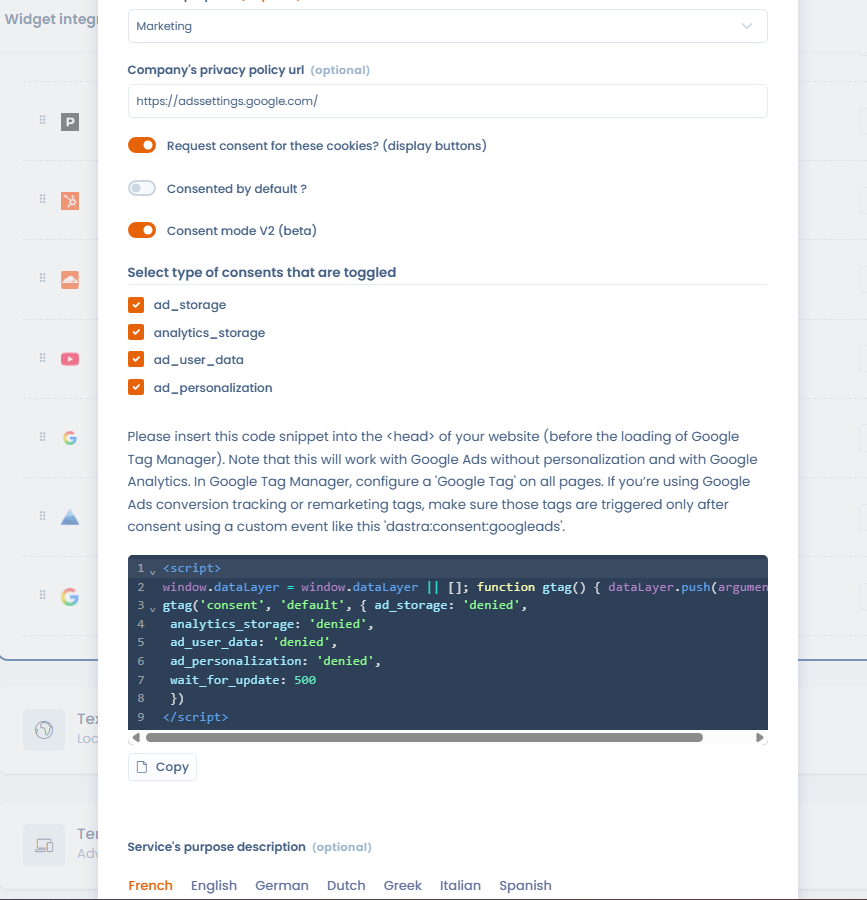
From the cookie widget integration, edit the relevant service (e.g. Google Analytics, Google Ads) and enable the **"Consent mode V2"** toggle. Once enabled, the Dastra banner will automatically send the `consent_update` signal to GTM each time a user interacts with the consent banner.
Then select the **types of consent** to be toggled for this service (all checked by default):
* `ad_storage`
* `analytics_storage`
* `ad_user_data`
* `ad_personalization`
Enabling Consent Mode V2 on a cookie widget service
The default consent snippet to insert in your website is displayed directly in the interface: use the **Copy** button to grab it, then follow step 2.
## Step 2 — Place the default consent code before GTM
For Google tags to wait for the consent signal before firing, insert the following snippet **before** the GTM initialisation code in your page:
```html
```
This snippet instructs Google tags to wait up to 500 ms for a `consent_update` signal before executing tracking. When the user accepts the relevant services, the Dastra banner automatically fires this signal and the tags can then execute.
{% hint style="warning" %}
This snippet must be placed **before** the GTM initialisation code. If it is loaded after GTM, Google tags may fire without waiting for consent.
{% endhint %}
## Installation: hard-coded or via GTM?
The Dastra CMP script can be integrated directly into the page source (hard-coded) or loaded via GTM. Both methods are valid. However, hard-coded installation is recommended because it guarantees that the default consent snippet (above) executes before GTM — which is a prerequisite for Consent Mode V2 to work correctly.
## Adding new services and resetting consent
Dastra does not automatically re-display the consent banner to visitors who have already made a choice when new services are added to the configuration. If you add a new tool (e.g. a new analytics service) and need to collect consent from existing visitors for that service, you must **reset consent** from the Dastra interface. A dedicated button in the widget configuration forces the banner to be shown again to all visitors on their next visit, including those who had already made a choice.
## Going further
To trigger tags based on user consent (dataLayer events, blocking triggers...), see the dedicated Google Tag Manager page:
{% content-ref url="/pages/-M5n29FF-y8wBMLdGgjt" %}
[Google Tag Manager](/en/features/gerer-le-consentement-aux-cookies/integration-technique/blocage-des-cookies/google-tag-manager.md)
{% endcontent-ref %}
---
# Agent Instructions
This documentation is published with GitBook. GitBook is the documentation platform designed so that both humans and AI agents can read, navigate, and reason over technical content effectively. Learn more at gitbook.com.
## Querying This Documentation
If you need additional information that is not directly available in this page, you can query the documentation by asking a question.
Perform an HTTP GET request on the following URL with the `ask` and `goal` query parameters:
```
GET https://doc.dastra.eu/en/features/gerer-le-consentement-aux-cookies/integration-technique/blocage-des-cookies/google-consent-mode-v2.md?ask=&goal=
```
`ask` is the immediate question: it should be specific, self-contained, and written in natural language.
`goal` is what the user is ultimately trying to achieve, the reason they need the answer. Sharing it helps GitBook give you a better, more relevant answer. A goal is most helpful when it describes the outcome the user wants rather than restating the question. For example, with `ask=how do I create an API token`, a goal like `automate deployments from our CI pipeline` lets GitBook tailor the answer to that use case.
The response will contain a direct answer to the question and relevant excerpts and sources from the documentation.
Use this mechanism when the answer is not explicitly present in the current page, you need clarification or additional context, or you want to retrieve related documentation sections.