> For the complete documentation index, see [llms.txt](https://doc.dastra.eu/llms.txt). Markdown versions of documentation pages are available by appending `.md` to page URLs; this page is available as [Markdown](https://doc.dastra.eu/en/features/gerer-le-consentement-aux-cookies/configuration-du-widget/us-privacy-ccpa-gpc.md).
# US Privacy: CCPA, GPC and DoNotTrack
Manage privacy compliance for your US users (CCPA/CPRA, GPC, DoNotTrack) with the Dastra cookie consent widget.
## Regulatory context
Unlike the GDPR which requires **opt-in** (prior consent), US privacy law is primarily based on an **opt-out** model: trackers can be placed by default, but users must be able to object easily.
Key regulations to be aware of:
| Law | State | Model | In force since |
| ----------- | ----------- | ------- | -------------- |
| CCPA / CPRA | California | Opt-out | 2020 / 2023 |
| CPA | Colorado | Opt-out | 2023 |
| VCDPA | Virginia | Opt-out | 2023 |
| CTDPA | Connecticut | Opt-out | 2023 |
{% hint style="info" %}
**GPC is mandatory in California**
Since CPRA (2023), businesses must honour the **Global Privacy Control (GPC)** signal as an opt-out request from the sale and sharing of personal data.
{% endhint %}
***
## Recommended approach with Dastra
### 1. Create a geo-targeted variant for the United States
The simplest way to handle your US users is to create a **geo-targeted variant** from the **Variants** tab of your widget.
For **California (CCPA/CPRA)**, configure the variant with an opt-out model: non-essential cookies are active by default, and users can opt out. Also consider adding a **"Do Not Sell or Share My Personal Information"** link in your site footer that opens the widget directly.
For **other US states** without a banner requirement, you can enable the **"Do not display a banner"** option with default consent values configured according to your policy.
{% content-ref url="/pages/Ag8hOV9o58Cn5f08UCRX" %}
[Geo-targeted variants](/en/features/gerer-le-consentement-aux-cookies/configuration-du-widget/geo-targeted-variants.md)
{% endcontent-ref %}
***
### 2. Honour GPC and DoNotTrack signals
Two browser signals allow a user to express their refusal to be tracked without interacting with a banner:
| Signal | Standard | Legally binding (CA) | Description |
| -------------------------------- | -------- | -------------------- | ---------------------------------------------------------- |
| **GPC** (`globalPrivacyControl`) | W3C | ✅ Yes (CPRA) | Opt-out signal for the sale/sharing of personal data |
| **DNT** (`doNotTrack`) | W3C | ❌ No | "Do not track" preference signal (not legally enforceable) |
#### Native activation (recommended)
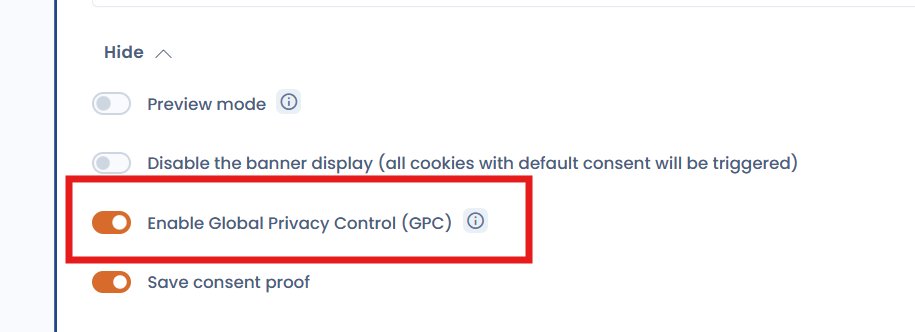
Dastra now supports these signals **natively** via a toggle in the widget configuration. Enable the **"Enable Global Privacy Control (GPC)"** option from **Widget configuration > Advanced settings**.
GPC option in the cookie consent widget advanced settings
When this option is enabled, the widget automatically refuses analytics and marketing cookies for any visitor whose browser sends a GPC or DoNotTrack signal — with no additional code required.
{% hint style="info" %}
Native activation is available from the current version of the Dastra widget. It covers both the `globalPrivacyControl` and the `doNotTrack` signals.
{% endhint %}
#### Advanced option — Custom JS snippet
If you need finer control (for example displaying an acknowledgment message or applying opt-out to specific categories), you can use the following JS snippet **in addition to** the native toggle, or instead of it if you manage the widget via the JS API:
```html
```
{% hint style="info" %}
**`dispatchEvent()` vs `save()` — what's the difference?**
* **`dispatchEvent()`** applies the consent choices for the current session **without writing anything** to the browser's localStorage. The GPC or DNT signal is re-evaluated on every page load. If the user later disables GPC in their browser, normal behaviour resumes automatically. This is the recommended approach for honouring these signals.
* **`save()`** persists the consent in localStorage, as if the user had made an explicit choice through the widget. Use this only when you want to remember a choice across sessions.
{% endhint %}
{% hint style="info" %}
**What does `hasConsented()` do?**
This check ensures the automatic opt-out does not override a consent choice the user has already made explicitly through the widget. If the user has already expressed a preference, that preference is respected.
{% endhint %}
{% hint style="warning" %}
This snippet must be placed **before** the Dastra widget loading tag so it is taken into account on the very first page load.
{% endhint %}
Category labels to use with `setPurposeConsent`:
| Category | Label |
| ------------ | -------------- |
| Necessary | `Necessary` |
| Preferences | `Preference` |
| Analytics | `Analytical` |
| Marketing | `Marketing` |
| Other | `Other` |
| Unclassified | `Unclassified` |
### 3. Displaying an "Opt-Out Request Honored" acknowledgment message
When a GPC or DNT signal is detected, regulations such as CPRA recommend informing the user that their opt-out request has been acknowledged. Dastra does not generate this message natively — you need to inject it into the page yourself.
Two approaches are available depending on the user experience you want.
#### Option A — Ephemeral toast
A message that appears for a few seconds then disappears automatically. Easy to implement, but the user may miss it if they are not looking at the page at the right moment.
```html
```
#### Option B — Persistent banner (recommended)
A fixed bar at the bottom of the page, visible as long as GPC is active in the browser. More robust for compliance: the indication is permanent, not only visible on first load. A Dismiss button lets the user close it.
```html
```
{% hint style="info" %}
Adapt the message text to your editorial style and your users' language. For multilingual sites, conditionally set the text based on the page locale.
{% endhint %}
***
## Summary
| Mechanism | Implementation | Legally required (CA) |
| ------------------------- | ------------------------------------------- | --------------------- |
| CCPA geo-targeted variant | Dastra interface | ✅ Yes |
| GPC detection | Native toggle (widget config) — recommended | ✅ Yes (CPRA) |
| DNT detection | Native toggle (widget config) — recommended | ❌ Recommended |
| Acknowledgment message | JS snippet (advanced option) | ❌ Recommended |
---
# Agent Instructions
This documentation is published with GitBook. GitBook is the documentation platform designed so that both humans and AI agents can read, navigate, and reason over technical content effectively. Learn more at gitbook.com.
## Querying This Documentation
If you need additional information that is not directly available in this page, you can query the documentation by asking a question.
Perform an HTTP GET request on the following URL with the `ask` and `goal` query parameters:
```
GET https://doc.dastra.eu/en/features/gerer-le-consentement-aux-cookies/configuration-du-widget/us-privacy-ccpa-gpc.md?ask=&goal=
```
`ask` is the immediate question: it should be specific, self-contained, and written in natural language.
`goal` is what the user is ultimately trying to achieve, the reason they need the answer. Sharing it helps GitBook give you a better, more relevant answer. A goal is most helpful when it describes the outcome the user wants rather than restating the question. For example, with `ask=how do I create an API token`, a goal like `automate deployments from our CI pipeline` lets GitBook tailor the answer to that use case.
The response will contain a direct answer to the question and relevant excerpts and sources from the documentation.
Use this mechanism when the answer is not explicitly present in the current page, you need clarification or additional context, or you want to retrieve related documentation sections.